Write your own skill
Turn a task you do more than twice into a command you run by name, without writing code.
You will be able to turn a task you repeat into a skill of your own that runs as a slash command, on a schedule if you want.
A skill is a saved recipe. You write the steps down once, give them a name, and from then on you run the whole thing by typing a slash and the name in the Terminal. Your assistant follows the same steps every time, so you are not re-explaining on Monday what you explained on Friday.
Your mineral ships with eleven of these (every skill your mineral ships with is the list). This page is about the twelfth: the one you write, for the task only you do.
A skill is a saved recipe#
What a skill actually is on your mineral: a folder, .claude/skills/<name>/, holding one file, SKILL.md. The top of the file is a short block of facts about it: name, title, description, and a category (one of briefing, capture, comms, box or other, which decides which group it sits in on the Skills page). The rest is a numbered procedure in plain English. That is all a skill is. No code. You could open it in any text editor and read it in a minute, and the Read the skill button on the Skills page does exactly that.
Because it is plain text, your assistant can write it for you. You describe the task; it drafts the file; you check the steps; it saves. Then you type /name.
The rule of two#
If you have done a task twice and can feel yourself about to do it a third time, that is a skill. Not "might be". Is.
Some examples, from imaginary businesses so you can see the shape:
- A garden-design studio sends the same site-visit summary after every first appointment: what was measured, what the client said they wanted, what comes next. Twice a week, from scratch, every time. That is
/site-notes. - A physio clinic closes each day by listing who cancelled, who needs a follow-up call, and which invoices went out. That is
/end-day. - A two-person accountancy writes a short "here is what we need from you" note to each new client. Same six asks, different name. That is
/welcome-pack.
None of those need anything the assistant cannot already do. They need the steps written down once.
The paste prompt#
Open the Terminal, describe the task in plain words, then paste this underneath with the brackets filled in:
I do this task often: [describe the task in plain English].
Build me a skill for it.

Create the folder .claude/skills/[name]/ and write SKILL.md
inside it. Frontmatter at the top: name, title, description
(one line), and category (one of briefing, capture, comms,
box, other). Body: a numbered procedure, one step per line,
in plain English.

Show me the whole file before you save it and wait for my
yes. Make it safe to re-run: running it twice on the same
day should update, not duplicate. It must never send
anything on my behalf: it drafts, I send.
Three lines in that prompt are doing real work. "Show me before you save" means you read the recipe before it exists, which is where most fixes happen. "Safe to re-run" is the difference between a skill you trust and one that quietly doubles up entries. And "never send" is your rule, stated inside the recipe so it applies every time. Drafting rather than sending is already how the assistant behaves; writing it into the skill keeps it that way for anything you build, and what it will not do has the full list of what is built in and what is yours to state.
If you would rather write the file by hand, Claude Code on your mineral opens the whole brain, skills folder included, in one session.
The "yours" chip#
Once saved, the skill appears on the Skills page next time you open it, in the group its category put it in, wearing a chip that says yours. Built-in skills say "built-in". The chip is the honest origin label: the page reads live from the mineral and shows what is actually there.
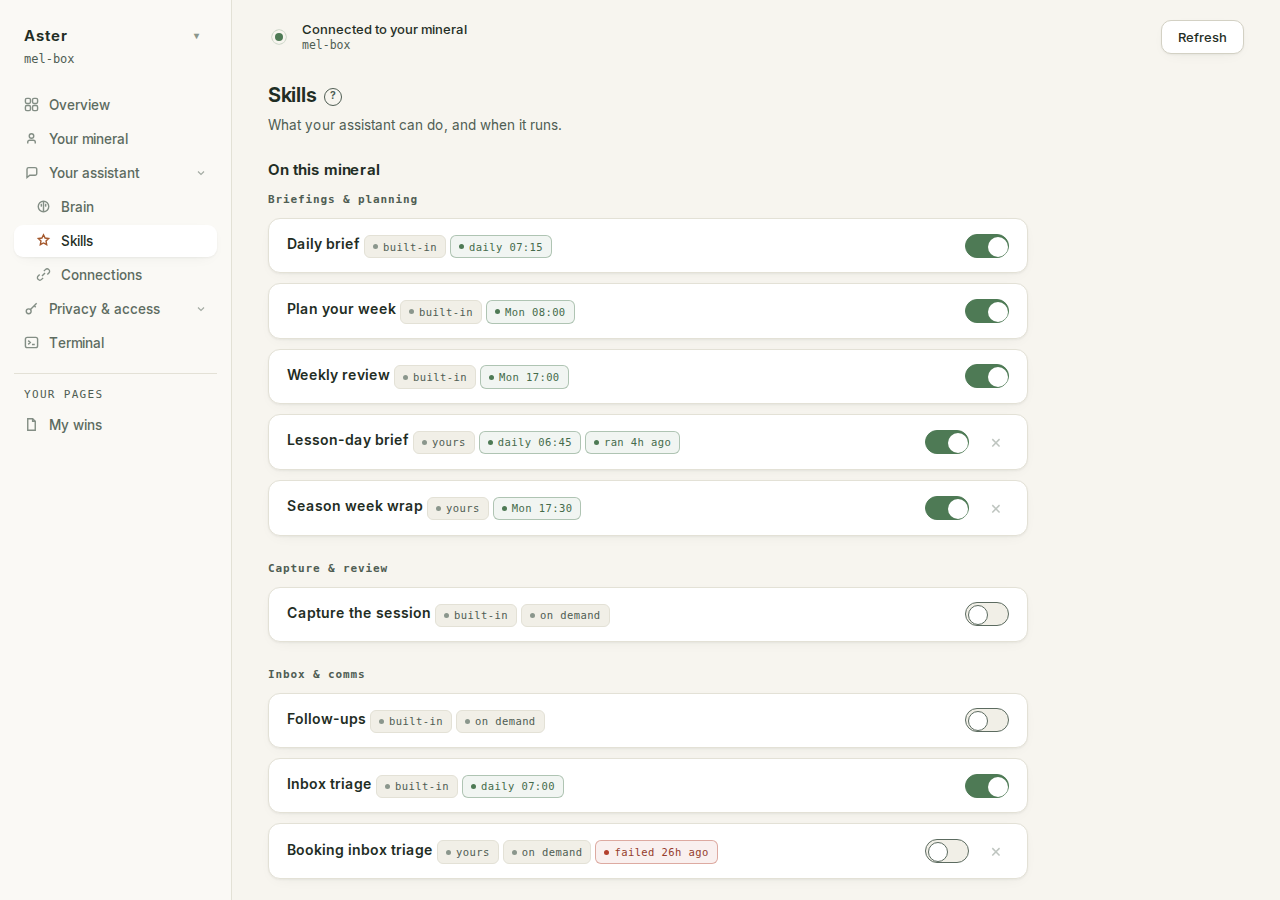
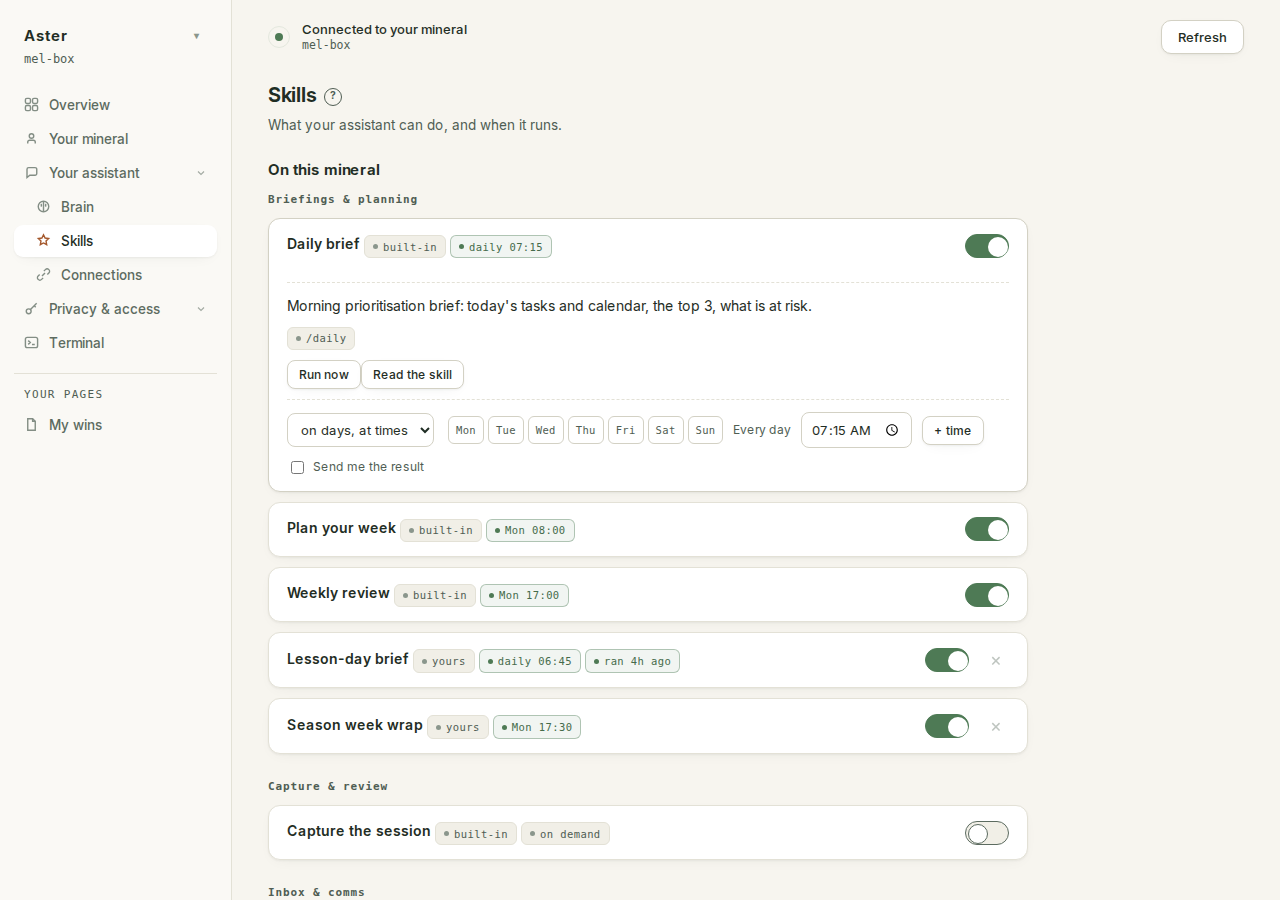
Open the row and you get the same drawer as any built-in: the description, the /name it answers to, Run now, and Read the skill. Run it on a real task straight away. Toy examples lie. Point /site-notes at a genuine appointment and you will know in two minutes whether the steps are right.
Schedule it#
A skill you have to remember to ask for is a skill you will forget. Anything with a natural rhythm (end of day, Monday morning, twice a week) can run on a schedule like the built-in ones: flip the switch on its row, pick the days and times, and press Save schedules. Tick Send me the result and the output lands in the Telegram bot you made in connect Telegram, as well as in your brain.
Two cautions, both stated on the Skills page itself. Schedules need the mineral's own Claude sign-in (one claude run in the Terminal, once), and a schedule is a promise to run with nobody watching, so only schedule a skill after it has run well by hand a few times.
Three golden rules#
- Run it on a real task first. The first run on real material tells you more than an hour of thinking about the steps.
- Edit it when it is not quite right. A skill is a text file, not a contract. If
/welcome-packkeeps sounding stiff, say "make /welcome-pack warmer and shorter" in the Terminal and it rewrites the recipe. Skills improve by use. If the problem is the sound of it rather than the steps, teach it your voice is the page. - Grow your own. Starter recipes is a shelf to begin with, not the whole library. Anything you do more than twice is a candidate.
keep the procedure short. Six to ten numbered steps is the sweet spot. A recipe with thirty steps is three skills pretending to be one.
The meta-prompt#
Every few weeks, ask your assistant to look at how you have actually been working:
Looking at how I actually work and the skills I have, what
skills should I add, edit, or remove? Be specific. Point to
tasks I keep doing by hand that could be a skill, and skills
I made but never use.
It can read every skill file on the mineral, and you can tell it which ones you actually run. Ask that roughly once a month. The aim is a small set you genuinely use, not a long list you ignore. Find what you do not know has more questions of this kind, the ones that surface what is missing rather than what is there.