Back up your mineral, and get it back
What is already backed up, the one thing you have to do yourself, and why the passphrase matters more than the backup.
You will be able to know what is already backed up, do the one step only you can, and get everything back.
Two different things get backed up, by two different mechanisms, and the second one has a step only you can do.
Your brain backs itself up#
Your brain is a folder of ordinary files, kept under git (the same change-tracking system programmers use, working quietly underneath; you never have to touch it). Connect GitHub and it pushes to a private repository in your own account, on its own, from then on.
That is the important half. It means the pages your assistant has written about your world exist somewhere that is not this machine and is not ours, in a format you can read in any text editor, on infrastructure we cannot reach.
If you do nothing else on this page, connect GitHub. The create wizard offers this exact step on its finish checklist, the moment your mineral first comes alive, so you may well have done it on day one; the chip there says so honestly either way. Later, and for any mineral made before the checklist existed, the same flow lives on the Backup card, midway down Your pebble:
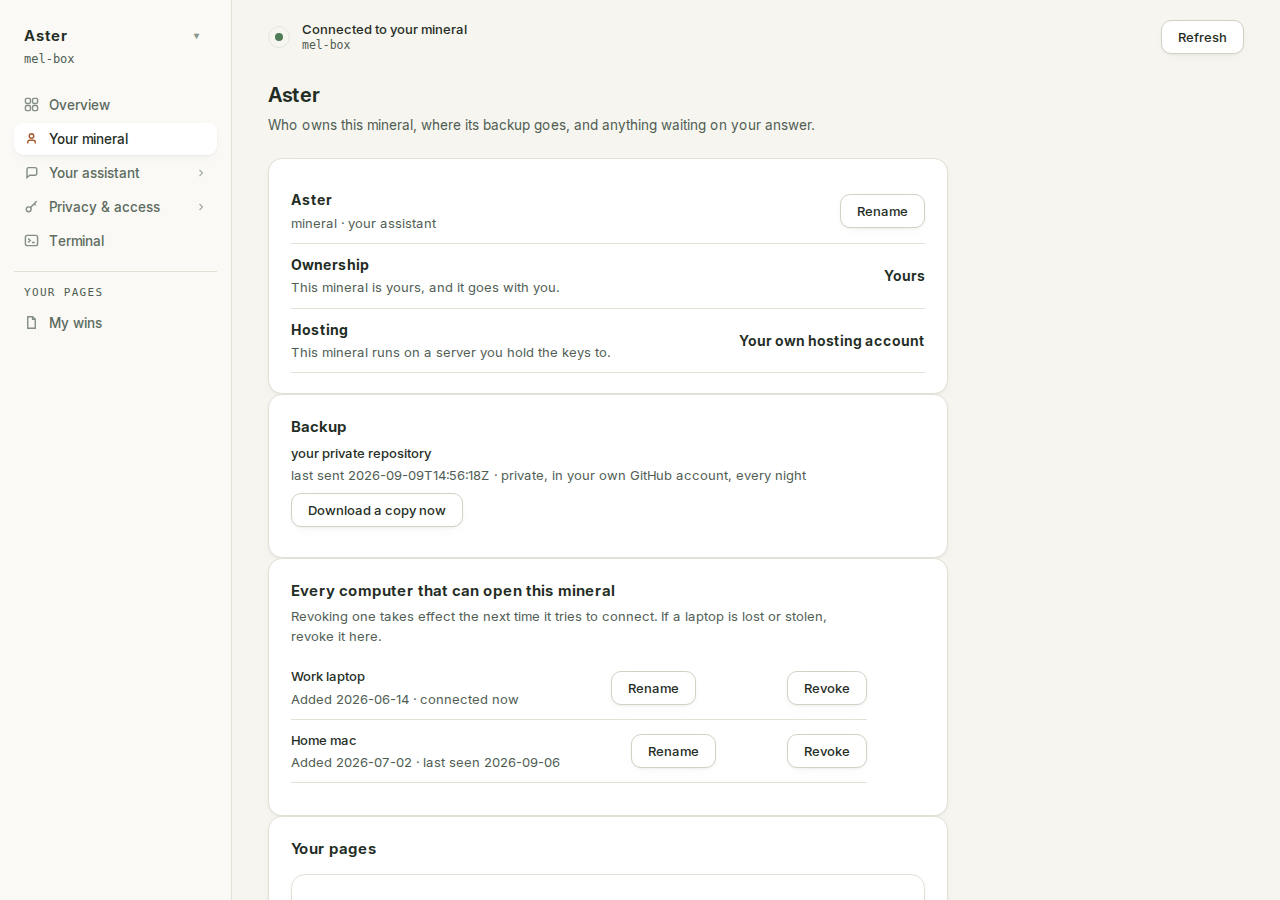
Here is the whole of it:
- If you do not have a GitHub account, make one at github.com first. The free kind is fine; it is a place to keep private copies of files.
- In the app, open Your pebble. The Backup card says where you stand. If nothing is connected yet it reads "Your brain lives on this mineral and nowhere else", which is the app being honest with you.
- Press Connect my GitHub. A code appears; approve it on the github.com page that opens. Nothing to install, nothing to type beyond the sign-in.
- Wait for the card to say Done. Your brain now lives at github.com/..., private and yours. From then on it stays current on its own, every night.
If the flow stops partway, it is safe to press again. The card names the leg that failed and keeps the steps that did work, and says so in its own words: "Nothing was lost: every step is safe to run again, so pressing Connect my GitHub picks up where this stopped."
Once connected, the card is one line of truth: the repository's name, the date your brain was last sent, and whose account it sits in: "private, in your own GitHub account, every night".
The card also offers Download a copy now at any time. That downloads your mineral's whole working state to the computer you are sitting at, minus credentials and history: keys, secrets and sign-ins are excluded from the archive, and the encrypted settings snapshot from the section below rides along inside it. Connected or not, that button is always yours.
Everything else backs up encrypted#
Some things cannot live in a git repository: your Claude sign-in, your service tokens, your bot token, your scheduled jobs, your connection wiring. Those are deliberately excluded from your brain repo, because a repository that carried your credentials would be a repository you could not safely share or clone.
So once a night your mineral tars them up, encrypts them on your machine with a passphrase generated on your machine, and pushes the encrypted blob to the same repository. Of that snapshot, the repository only ever sees ciphertext; your brain pages ride the same repository as readable files you own. We never hold the passphrase.
In your terms, the encrypted snapshot holds: your Claude sign-in, your Telegram link, your browser-editor password, your GitHub sign-in, your schedule, your connection wiring, and your profile. In other words, everything that makes a fresh machine yours again.
It runs nightly at 03:40 mineral time, deliberately just before the 03:50 brain push and the 04:10 software restart: the snapshot is written, ten minutes later it leaves the box with the brain push, and only then does the machine restart.
And every night's snapshot is proven before it counts: the fresh blob is decrypted and unpacked in a drill, every file that went in is checked to come back out, and only then does it replace last night's copy. A failed run can never destroy the previous good snapshot, because the previous one is not touched until the new one has passed.
Without GitHub connected, the snapshot dies with the machine. The nightly blob is still written, but it stays local-only, on the very machine it exists to survive. Connecting GitHub is what puts both halves offsite at once: the readable brain and the encrypted snapshot travel in the same repository.
The step only you can do#
Here is the catch, and it is a real one rather than a formality.
The passphrase is generated on your mineral on the first backup run, and printed once, on that run. Its only other copy is inside the backup it encrypts.
Which means: if your machine dies and the passphrase lived only on that machine, you have an encrypted blob that nobody, including us, can open. That is not a backup. It is a souvenir.
So take the passphrase off the box, once, into wherever you keep things like that: a password manager, or a piece of paper somewhere safe. The passphrase lives in your mineral's own secrets, which your assistant can read for you, so the way to do it is to ask, in the Terminal, in plain words:
Show me my backup passphrase so I can store it somewhere safe,
then record that I have.
Your mineral tracks whether this has happened. The record is a file the Secrets page lists as the backup passphrase escrow marker, and until it exists the nightly record refuses to call the snapshot recoverable. That is not nagging, it is the honest state.
The distinction it is holding onto is worth stating: offsite is not the same as recoverable. The nightly record tracks both, separately. Offsite means the encrypted copy left the box. Recoverable means somebody can actually decrypt it, which needs the passphrase recorded off the box too. Until you do the step above, the record carries its own warning, verbatim: "the backup passphrase has not been recorded off this box, so this snapshot cannot be decrypted once the VM is gone".
Getting it back#
Restoring is a real, tested procedure rather than a hope. It needs the encrypted blob, which is in your repository, and the passphrase, which is with you.
What it involves, honestly: a fresh mineral is stood up with the same wizard that built the first one; your brain comes back from your repository; the snapshot is decrypted with your passphrase; and the proof it all worked is a test brief arriving on your Telegram. The one thing that may need you again is your Claude sign-in, if it was revoked in the meantime: one fresh sign-in, same as your first day.
There is a written runbook for this rather than improvisation, and it is worth knowing it exists before you need it, because a backup nobody has tested is not a backup.
What is not backed up#
Anything you never told your assistant, and anything you deleted before the last run. Backups are nightly, not continuous.
If you are about to do something drastic to your brain, the safe move is to let a night pass first, or push your brain manually before you start.