Secrets
Every password, token and key this mineral holds, and what each one is for.
Every password, token and key this mineral holds, and what each one is for.
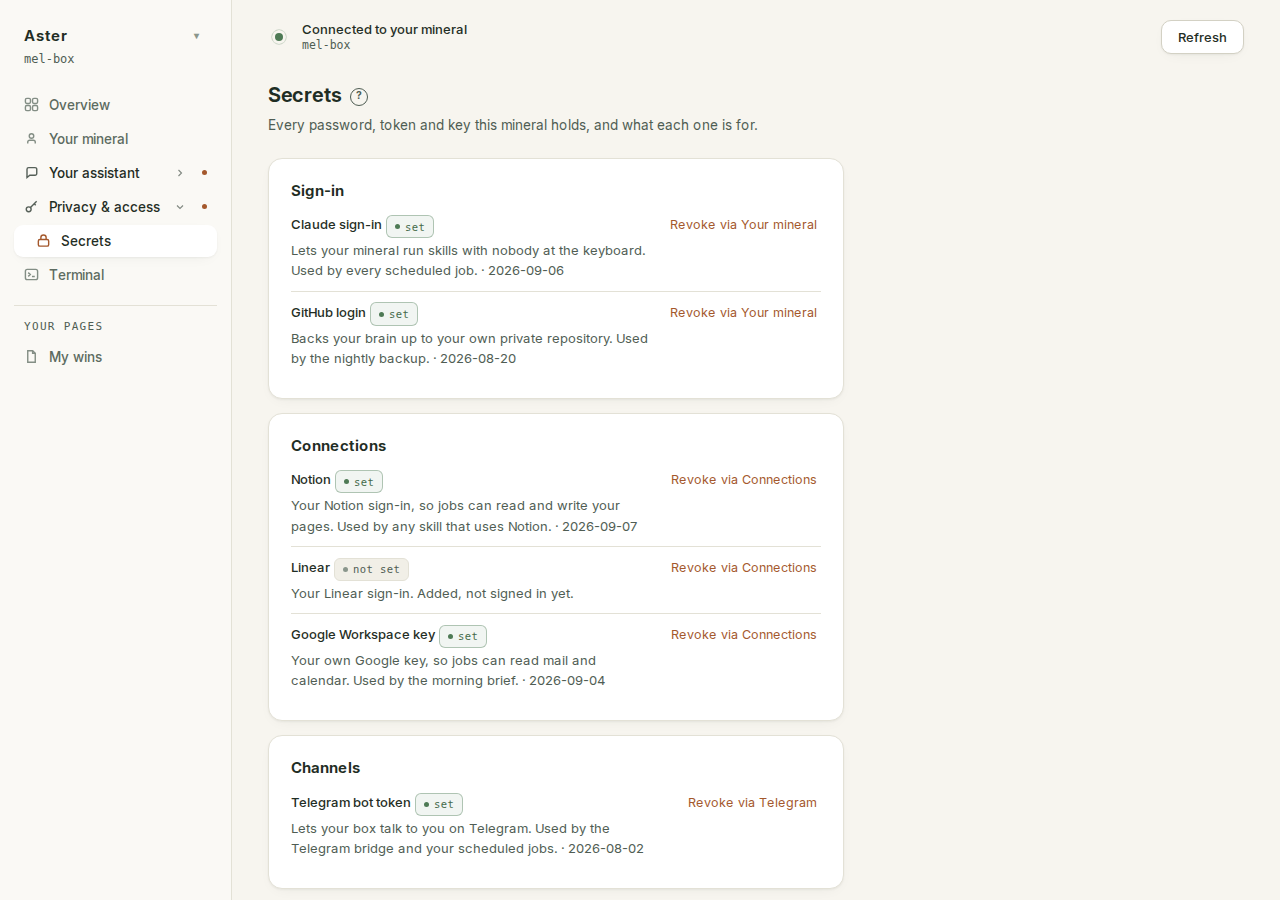
A ledger rather than a vault door. Entries are grouped by what they are for, under six headings: Sign-in, Connections, Channels, Backups, Platform and Vault (anything the page cannot place lands under Other rather than being hidden). Each row says whether it is set and where revoking it happens, so "what does this machine know about my accounts" has an answer you can read instead of being something you hope about.
How to read a row#
Every row is the same four things. A plain name ("Telegram bot token", "Google Workspace sign-in"). A chip that says "set" or "not set". A line saying what the thing is and who on the box uses it ("Lets your box talk to you on Telegram. Used by the Telegram bridge and your scheduled jobs."), with the date it last changed. And, where revoking is yours to do, a button: "Revoke via Connections", "Revoke via Your pebble", "Revoke via Telegram". Pressing it does not revoke anything by itself; it lands you on the surface that owns the credential, on the exact row, where disconnecting destroys it. Rows without a button are the box's own plumbing (status keys, directory tokens): nothing of yours to revoke there.
Be precise about what "set" means: the entry holds something non-empty. That is all. A wrong password is set; an expired token is set. Whether a credential still works is the Connections page's question, answered live. And an entry this page cannot read at all shows as "not set", because unreadable-by-us must never dress up as present.
One kind of row earns its place by pointing at an absence. A connection can expect a named credential from the box's environment rather than carrying its own, and when that variable is not set, the connection breaks silently: the server is configured, the credential is missing, and nothing says so until a skill fails. Those rows exist so the gap is visible here first, as a "not set" chip, instead of surfacing days later as a job that stopped.
Where the rows come from#
The ledger enumerates known places: the vault's own entries, the box's named secret files, the Claude sign-in, GitHub access, your own Google key, the sign-in renewal entries for each connection, and any API token sitting inside a connection's definition. It never walks the disk looking for things that might be secrets, because a walk over your state would sweep up the brain, and this page has no business reading that.
And it returns no values. The code that produces this list states its own contract: it never returns a secret value, not truncated, not masked, not hashed. The only fact derived from a secret's content is the "set" boolean, which comes from a length check. The one visible exception is the email on the Google row, which you typed into the wizard yourself.
The two tiers, and the choice they represent#
This is the most consequential thing on the page, and it is a real trade rather than a setting to leave alone.
| Available to the box | Sealed to your devices | |
|---|---|---|
| Stored as | a value on the disk | an envelope only your machines can open |
| A 3am job can use it | yes | no |
| Readable by someone with server access | yes | no |
| Readable during a support session you grant | yes | no |
The first tier is not encrypted at rest, deliberately. The box would have to keep the key on the same disk in order to use it while you are asleep, so encrypting it there would be ceremony rather than security. The privacy policy states what that means for a support session; treat it as the working assumption for anything in that tier.
The rule of thumb: if a credential would be damaging in someone else's hands and nothing scheduled needs it, seal it. If a scheduled job needs it at 3am, it has to be available to the box, and that is the price of the job running without you.
Sealed secrets and your computers#
Sealed entries appear in the Vault group with their own honest wording: "A secret you sealed to your own computers. This box cannot open it." Sealing targets your enrolled, active devices and nothing else; a support grant is never a sealing target, so letting support in never lets support open the sealed tier.
Opening this page also quietly heals the sealed tier. This computer publishes its own key onto the device roster if it has not yet, and when that just happened, existing sealed secrets are re-wrapped so this computer can open them too. The only visible trace is a notice when it did something: "Sealed secrets now open on this computer too", naming them. A secret sealed before this computer was enrolled cannot be healed from here, and the page says what to do instead: open the app on an older computer to refresh it.
The two backup rows#
Backups get two entries, and the second is the one to check. "Backup passphrase" encrypts your nightly backup before it leaves the box. "Backup passphrase, escrow marker" is a note that the passphrase has been saved to your own computer, off the box. Recoverable means both: a copy offsite and the passphrase recorded somewhere that is not the machine it protects. Without the escrow, the day the machine is gone is the day the snapshot becomes undecryptable, with the passphrase inside it. The full story is back up and restore.
When there is nothing to show#
A mineral with no credentials yet says so plainly: "Nothing held yet. Connect something on the Connections page and it appears here." And when your assistant is not running, the page refuses to guess: "Cannot read this while your assistant is not running." An unreadable mineral is reported as unreadable, never as empty.
Why it is read-only#
The page lists and explains; it no longer offers Add and Delete, and there is no per-row control here at all. Secrets arrive by connecting the thing that needs them, which is how they arrive correctly scoped and correctly named, and they leave by disconnecting it. A secret typed in by hand is a secret nothing knows the purpose of.