Starter recipes
Twelve recipes for a working week, five already on your mineral to switch on and seven to build as skills of your own.
The eleven built-in skills cover the rhythm of a week. They do not cover the work that is particular to you: the note after every site visit, the reply you draft ten times a day, the brief before a call. This page is a shelf for both halves. Five recipes are already skills on your mineral and only need switching on. Seven you build as skills of your own by pasting a prompt into the Terminal, the way write your own skill describes.
Every card has the same parts: what it does, when, the prompt (or the switch), and how you will know it worked. Do not build the whole shelf at once; the last section gives an order.
Ask, skill, recipe or page#
Before building anything, pick the smallest thing that solves it:
- Ask. A one-off question or draft: type it in the Terminal.
- Skill. A task you have done twice and will do again: write it as a skill of your own and it runs as
/name. - Recipe. A built-in skill on a schedule: flip the switch on the Skills page. The five below are this.
- Page. A view you glance at rather than ask for (a pipeline board, this week's numbers):
/dashboardbuilds you a page or a card.
Already on your mineral#
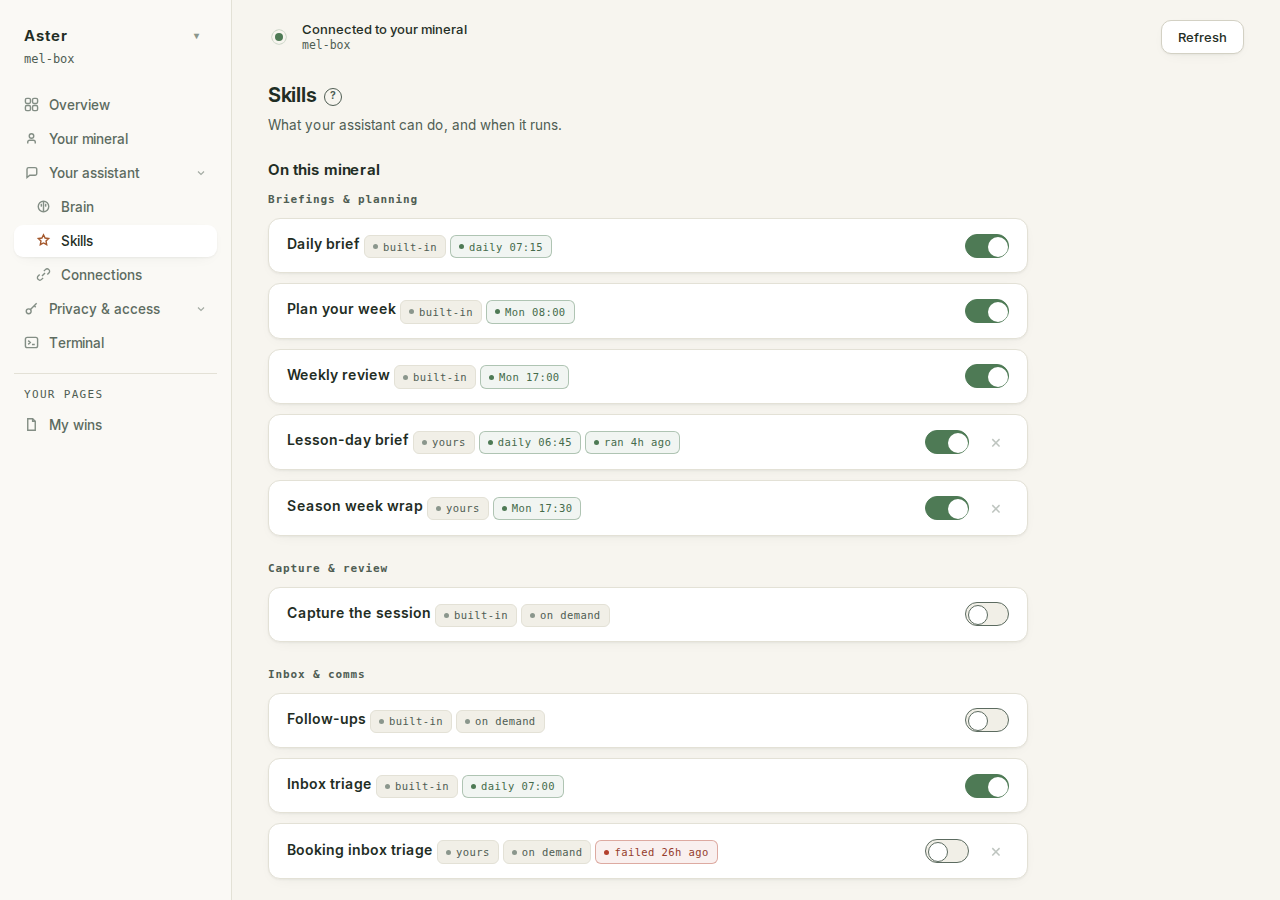
These five are engine skills. They ship switched off, like every schedule; switching one on, choosing a time and pressing Save schedules is the whole job. Each needs the mineral's own Claude sign-in first (one claude run in the Terminal) and can deliver to your Telegram bot (Send me the result).
| Recipe | Skill | When | You will know it worked when |
|---|---|---|---|
| Plan the week and close it | /plan-week Monday morning, /weekly Sunday evening | Once a week each. One sets three to five outcomes, the other reviews against them. | Monday starts with the outcomes already written; Sunday ends with an honest list of what moved and what stalled. |
| The daily brief | /daily | Each weekday morning, after triage if you run both. | You read it, nod, and know where to start. |
| Capture the session | /capture | At the end of any real session, before you close it. It shows what it will write before writing. | A decision you had half forgotten turns up and you think "yes, save that". |
| Inbox triage | /inbox | Early morning, once mail is connected. One confirmation before any label is touched. | Forty unread become a short reply-owed list and a long ignore list. |
| Chase replies owed | /followup | Twice a week. It surfaces; it changes nothing. | Two threads you had lost track of appear while there is still time. |
Run your week#
Plan on Monday, brief each morning, work, close each day, review on Sunday. Four of those beats are built in. The close of the day is the one to build.
/end-day#
What it does. A short close: what shipped, what slipped, what carries to tomorrow. It makes progress visible, which is half the reason to do it.
When. Last thing before you shut the laptop. Two minutes.
Create .claude/skills/end-day/SKILL.md. Frontmatter: name:
end-day, title: End of day, description: What shipped, what
slipped, what carries over, category: briefing.

Body, a numbered procedure:
1. Read this week's outcomes, and today's calendar and tasks
   from whatever is connected.
2. Skim today's session for decisions or things learned.
3. Write three short lists: Shipped, Slipped, Carry over.
4. Name tomorrow's first move.
5. Show me the summary and wait for my yes, then write it to
   today's page in the brain. Re-running on the same day
   updates that page, no second entry.

Show me the file before saving it.
You will know it worked when tomorrow's brief has something to build on.
Comms#
Triage and the chase are built in. The draft is yours to build, because it has to sound like you.
/draft#
What it does. You give it a one-line brief ("say yes, push it to next week, keep it friendly") and it writes the reply the way you would. It never sends. Each time you edit before sending and tell it what changed, it learns.
When. Any email you would rather not write from scratch. Especially the polite but firm ones.
Create .claude/skills/draft/SKILL.md. Frontmatter: name:
draft, title: Draft a reply, description: A reply in my voice
from a one-line brief, category: comms.

Body, a numbered procedure:
1. Take the thread (from connected mail, or what I paste) and
   my one-line brief on what to say and the tone.
2. First read how I write in layer 8 of the brain
   (wiki/_layers/8-workflow.md): phrasing, length, words I
   never use.
3. Draft the reply in my voice, at the length I would send.
4. Show me the draft. Never send it.
5. When I tell you what I changed before sending, add what
   changed to layer 8. That is the lesson.

Show me the file before saving it.
You will know it worked when you barely change a word, and the few changes you do make show up in the next one. Teach it your voice is the long version of step 5.
Research and prep#
One honest limit first: your assistant researches from what it can reach. That means your brain, the services you have connected, what you paste into the Terminal, and a search service like Exa if you have added one from the catalogue (what you can connect lists it). It does not browse the web on its own, and a research recipe should say what it could not reach.
/prospect#
What it does. One page before a call: who they are, what you have exchanged before, what they seem to care about, three questions to ask.
When. Before any first call: a new client, a supplier, a hire.
Create .claude/skills/prospect/SKILL.md. Frontmatter: name:
prospect, title: Brief before a call, description: One page
on a person or company before I meet them, category: other.

Body, a numbered procedure:
1. Take a name or company plus any context I give.
2. Gather what you can reach: their page in the brain,
   anything in connected mail or calendar, and a web search
   only if a search service is connected. Say what you
   could not check.
3. Write one page: who they are, recent signals, what they
   seem to care about, three questions to ask.
4. Label every guess as a guess.
5. Show me the page and wait for my yes, then save it in the
   brain under their name. Re-running updates the same page.

Show me the file before saving it.
You will know it worked when you walk in knowing the last thing they said to you and with two good questions ready.
/research#
What it does. A brief on a market, a competitor or a topic, sources listed at the end, every unverified line marked. Something you could act on.
When. Weighing a new offer or sizing up a competitor. If the decision is a new offer, one ordering worth holding in mind is Greg Isenberg's: audience first, then community, then product (where these ideas come from).
Create .claude/skills/research/SKILL.md. Frontmatter: name:
research, title: Research brief, description: A sourced brief
on a market, competitor or topic, category: other.

Body, a numbered procedure:
1. Take my topic and the decision it is feeding.
2. Use the brain, connected services, anything I paste, and a
   search service if one is connected. If none is, say so up
   top. Do not rely on one source.
3. Write the brief: the short answer first, then the detail
   under clear headings.
4. List every source at the end. A claim with no source is
   marked unverified, not dropped silently.
5. Where sources disagree, say so rather than smoothing it.
6. Show me the brief and wait for my yes, then save it in the
   brain with today's date.

Show me the file before saving it.
You will know it worked when every claim has a source beside it or an honest "unverified", and you would repeat any of it to a client.
/verify#
What it does. Checks the factual claims in something you are about to send. Assistants sometimes state things confidently that are not true; this is the catch before it goes out with your name on it.
When. Before anything client-facing leaves, especially if the assistant helped write it.
Create .claude/skills/verify/SKILL.md. Frontmatter: name:
verify, title: Check before I send, description: Fact-check
the claims in a document before it goes out, category: other.

Body, a numbered procedure:
1. Take the document I am about to send.
2. Pull out every factual claim: numbers, names, dates,
   quotes, "studies show" lines.
3. Check each against the brain, connected services, and a
   search service if connected. Mark it confirmed,
   unconfirmed or wrong, with where you looked.
4. List what you could not confirm so I can cut or check it.
5. Do not change the document. Report only.

Show me the file before saving it.
You will know it worked when it flags one shaky number you would have sent without thinking.
"confirmed" means it found the claim somewhere it could reach, not that the source was right. For anything expensive, open the source yourself.
Deliverables and pipeline#
/report#
What it does. You hand it the messy stuff (meeting notes, a few numbers, some bullets) and it gives back a recap you could send a client. The structure done for you; the judgement still yours. Its second job: point it at a report you were pleased with and it strips the one-off back to a template with the changeable parts marked.
When. After a client meeting, at the end of a project phase, or the second time you catch yourself rewriting something you have written before.
Create .claude/skills/report/SKILL.md. Frontmatter: name:
report, title: Report or template, description: Raw notes
into a client-ready report, or a good one-off into a
template, category: other.

Body, a numbered procedure:
1. Take my raw inputs (notes, numbers, bullets, a transcript)
   or a finished document I want turned into a template.
2. If I have not said, ask who it is for and what they need
   to take away.
3. For a report: a short summary, detail under headings,
   next steps at the end, in my voice from layer 8.
4. For a template: keep what stays the same, replace what
   changes (names, dates, prices) with [PLACEHOLDERS], and
   add one line at the top on when to use it.
5. Show me the draft and wait for my yes, then save it in the
   brain. Never send it on my behalf.

Show me the file before saving it.
You will know it worked when meeting scribbles become a recap you would put your name on, and the next proposal takes ten minutes because most of it was already written.
/leads#
What it does. Each lead, its stage, the next action, and a flag on anything gone cold. Not a CRM. Just enough to stop good work dying quietly.
When. Whenever a lead moves, and as a weekly scan for what has gone quiet.
Create .claude/skills/leads/SKILL.md. Frontmatter: name:
leads, title: Pipeline, description: Lead, stage, next
action, and what has gone cold, category: other.

Body, a numbered procedure:
1. Keep one table on a brain page called leads: name, stage,
   value, next action, last touch.
2. On an update, show me the row before and after and wait
   for my yes. One row at a time.
3. Never write a change I have not seen.
4. On request, flag any lead untouched for ten days as going
   cold, with a suggested next step.
5. Keep the table sorted by stage.

Show me the file before saving it.
You will know it worked when "what is about to slip" takes one glance instead of a scroll through your inbox.
Build in waves#
Twelve recipes at once is a shelf you never run. Build in waves, and add the next wave only when the last one has earned its place.
| Wave | Build | Why first |
|---|---|---|
| 1 | Plan the week and close it, the daily brief, /end-day | The rhythm. The assistant becomes part of your week instead of a thing you forget to open. |
| 2 | Inbox triage, chase replies owed, /draft | The biggest time drain in most businesses, and the fastest payback. |
| 3 | /prospect, /research, /verify | When a call or a decision is coming up and you feel the need. |
| 4 | /report, /leads, capture the session | As the work shows up: a recap to write, a pipeline to watch, a session worth keeping. |
Simpler still: switch on the daily brief and the weekly pair tomorrow and live with them for a week. When you next think "I wish it could just", come back and build the one that answers it. A day with your assistant shows a week with the shelf in use.