Fix a connection that has stopped working
What an expired token looks like, why it happens, and the one place that tells you the truth.
You will be able to tell an expired sign-in from a real fault, and put it right from the one page that knows.
Connections break. Not often, and almost never because of anything you did: an outside service changes a rule, or a sign-in reaches the end of its life and needs you once.
The thing that makes this survivable is that you find out on a page rather than by noticing your morning brief stopped arriving three weeks ago.
Where to look#
The Connections page, and only the Connections page. It shows every service your mineral is wired to and whether it is working, in plain words.
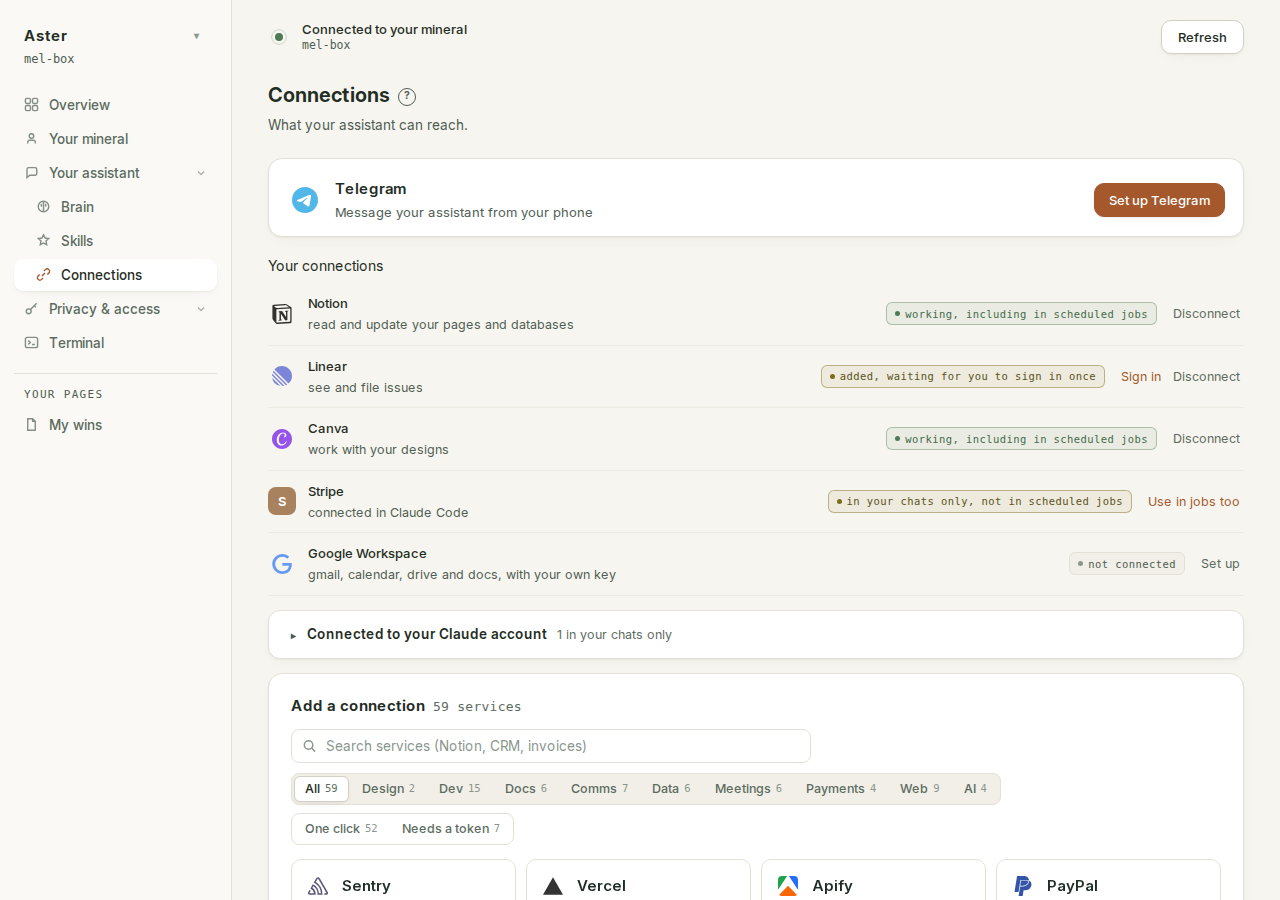
That page is a live view. It is not a cached status that might be old: it is read from your mineral when you open it, which is the entire reason to trust it.
What the row can say#
The vocabulary is deliberately small. Six states cover every row:
| What it says | What it means | What to do |
|---|---|---|
| "working, including in scheduled jobs" | The credential is present and current, and your jobs load this service. | Nothing. |
| "added, waiting for you to sign in once" | The service is set up on your mineral but has never been signed in. | Press Sign in. |
| "sign-in expired, needs you once more" | The credential reached the end of its life. The service is fine; the sign-in is not. | Press Sign in. |
| "not connected" | Nothing is set up. | Press Connect, if you want it. |
| "in your chats only, not in scheduled jobs" | Connected inside Claude Code, invisible to your scheduled jobs. | Press Use in jobs too. |
| "sign-in can never finish on this endpoint, disconnect it" | A dead first-generation Google endpoint from before the current Google flow. | Press Disconnect; connect Google from its own row instead. |
The usual cause#
A sign-in expired. Most services hand your mineral a credential that lasts a while and then stops, and some of them stop sooner than you would expect.
When that happens the row says so and asks you to sign in again. It does not silently retry forever and it does not send you a ping every hour: one clear statement, in the place you would look.
Fixing it#
- Open Connections.
- Find the row that is not green.
- Read what it says. The row names the actual problem rather than saying something went wrong.
- Sign in again where it asks you to.
Most of the time that is the whole fix, and it is two clicks because your mineral still holds everything except the expired part.
What keeps sign-ins alive unattended#
You should not need the fix above often, because a renewal job on your mineral does the routine part for you: any sign-in coming within about 30 minutes of expiry gets refreshed on the spot, unattended. A refresh that fails is reported, never hidden and never retried into a rate limit, and the connection keeps working until the credential actually expires, so you are only asked for anything when the row truly needs you.
A few services grant no renewable sign-in at all. Their rows say so up front, under the status: "Signs you out periodically; you will need to authorise it again when it does." For those, the occasional re-sign-in is the service's design, not a fault.
"In your chats only", and the missing brief#
This one is a failure class of its own, because nothing is actually broken. A service you connected inside Claude Code works whenever you chat, and is invisible to your scheduled jobs, so your morning brief cannot read it. The row says exactly that ("in your chats only, not in scheduled jobs") and carries one button, Use in jobs too, which moves the connection to where jobs load it. The sign-in survives the move; you will not be asked to authorise again.
Connectors on your Claude account#
A connector added in the Claude app's own settings is a different animal again: it lives on your Claude account, not on your mineral, so this page can show it but can never fix or move it; your mineral holds nothing of it. Its row says so: "in your chats only. Account connectors can never run in scheduled jobs; connect it to your box to schedule it." If you want a scheduled job reading that service, connect it to your mineral from this page.
API-token connections#
A connection made with an API token (its row says "API token") never expires the way sign-ins do: it is credentialed from the moment the token is saved, with no sign-in to renew. If one of these breaks, the token was revoked or rotated at the service itself; get a fresh token there and reconnect.
When a scheduled job was relying on it#
This is the part worth knowing. Your cadence runs while you are asleep, and a job that needed a dead connection fails rather than pretending. It does not send a half-empty brief and it does not quietly skip the bit it could not read.
So if your morning brief did not arrive, the Connections page is the first place to look, before you conclude your assistant has stopped working. Fix the connection and the next scheduled run picks up normally; there is nothing to reset.
The Google special case#
Google is the one connection your mineral actively watches: roughly every six hours it checks the key against Google itself, only a definitive refusal from Google counts as death (a network blip never does), and if the key ever dies you get exactly one Telegram message, then silence. The fix really is two clicks: Connections, then Google, then Sign in. The full story is on connecting Google.
If your mineral is behind#
The app updates itself in minutes; your mineral updates only on a restart you choose. When the two drift too far apart, buttons on this page used to fail oddly (at its worst, a raw "bad server url" on every press). Now the page detects the version skew and says so in words: "That needs a newer version of your mineral. Open the Claude Code tab, press Update and restart (about a minute, nothing of yours changes), then try again." That update is the whole fix.
If a connect is refused as a duplicate#
Two refusals protect you from wiring the same service twice. Connecting an address your mineral already has, under any name, answers 'already connected as "…" on this box', naming the existing row. And connecting a featured service by hand answers that it 'is a featured service, connect it from its own row', because the row's own flow is the one that gets its sign-in right.
What disconnecting actually does#
Disconnect has one meaning, for every connection: the credential is destroyed on your mineral. The confirmation says it in full, for example: "Notion is disconnected and its credential is gone from this box. The permission you granted at Notion is yours to revoke there." The second half matters: the grant on the provider's side is yours, made in your account, and your mineral does not reach in to undo it. Revoke it in the service's own settings if you want it gone entirely.
One exception, by design: a server you added by hand inside Claude Code is shown on this page but gets no Disconnect button, and asking anyway is refused with 'was not added here, so it is not removed here'. What you made in Claude Code, you remove in Claude Code.
Telegram's own broken state#
The Telegram card has one half-done state of its own: the chip reading "one step left" means the bot token was saved but the pairing code was never answered, so the link never finished. The fix is Finish setup (send the code the card shows you), not Disconnect. The steps are on connecting Telegram.
The second place that tells the truth#
The Secrets page lists every credential on your mineral, one row each, and each connection's row says where to revoke it, pointing back at the Connections page. It also covers the one break this page cannot show you in advance: a connection set up to read a named credential from the mineral's environment breaks silently when that credential is not set, with nothing saying so until a skill fails. The Secrets row for it says plainly whether it is set, which is why those rows exist.
When it is not you#
Sometimes the outside service has changed something and no amount of signing in will help. Those are ours to fix, and the honest position is in the terms: when a connector breaks because Google or Microsoft moved something, we fix it if we can and tell you if we cannot.
If a row keeps failing after you have signed in again, that is worth reporting rather than retrying. For everything that is not a connection, when something looks wrong is the short list. Every fix ships with a test that pins it, so a connector that broke once and got fixed does not quietly break the same way twice.
What never expires#
Your brain. Your pages. Your skills. Your cadence. A dead connection is a dead door to somebody else's service, not damage to your mineral. Everything your assistant knows is still there while you sort the door out.