Skills
What your assistant can do, and when it runs.
What your assistant can do, and when it runs.
Two things on one page, deliberately: the list of skills, and the schedule each one runs on. They belong together because a skill nobody scheduled is a skill you have to remember to ask for.
The list#
Every mineral ships with the same engine set: everyday skills like capture, connect, daily, dashboard, explain, followup, inbox, onboard, plan-week and weekly, plus write-page, which builds you a page of your own. They are also the terminal's slash commands (/daily, /inbox and so on), and every skill your mineral ships with is the generated, authoritative list. Anything beyond that set is something you wrote, or asked your assistant to write, in the Terminal.
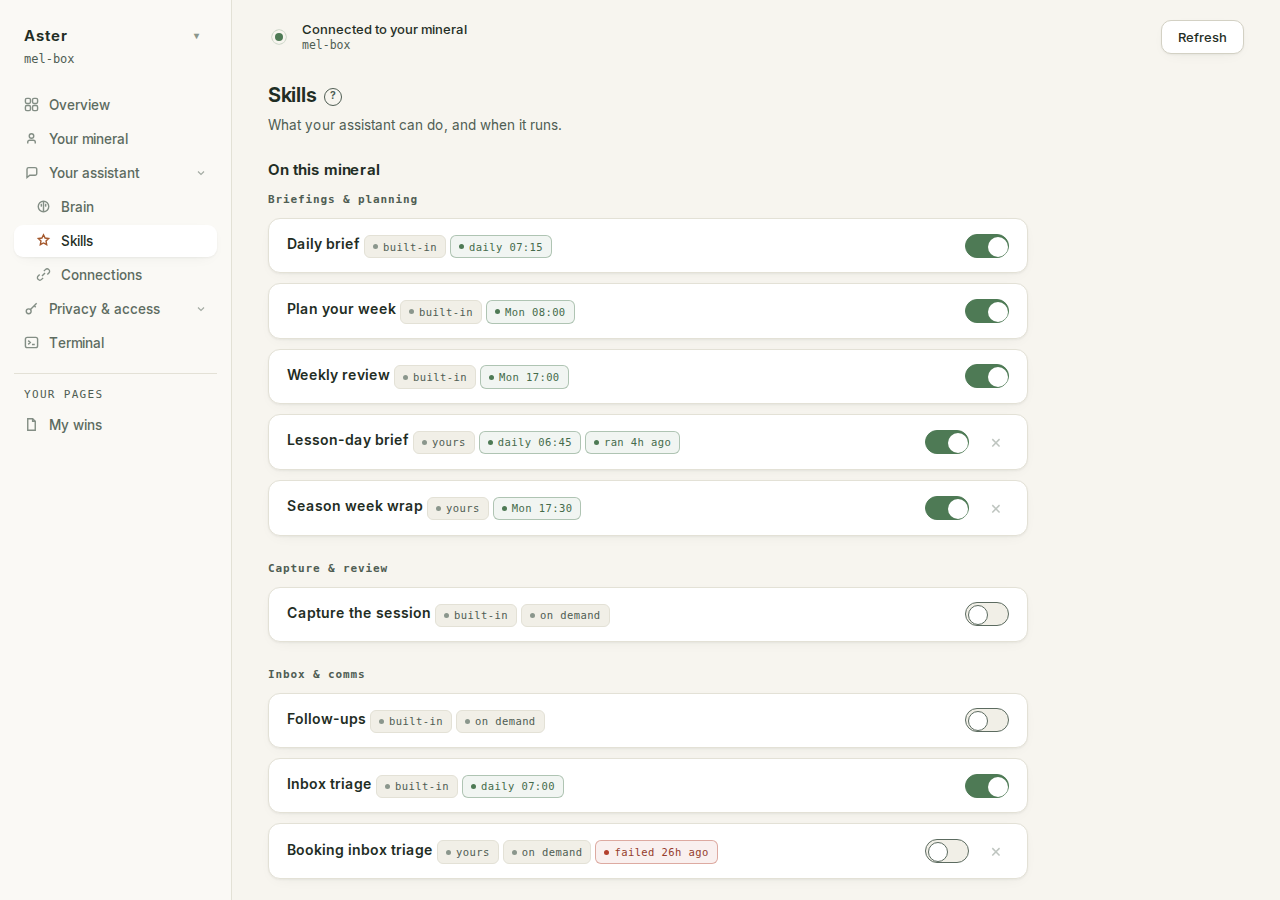
The page is one list, "On this mineral": everything installed, grouped by category (briefings and planning, capture and review, inbox and comms, your mineral, other), and every card wears an origin chip that says where it came from: "built-in" for engine skills, "starter" for seeded ones, "yours" for anything you wrote.
Each row stays slim: the skill's name, its chips, and a switch for whether it runs. Everything else lives in a drawer that opens on the row.
If the page is empty, it says why: "No skills found yet. That usually means the mineral is still setting itself up; try again in a minute."
Inside a row#
The drawer carries the description, the /id it answers to, and the actions:
- Run now starts the skill in the background, and the page says exactly what that means: "It works in the background on your mineral; the result lands in your brain." When it completes you get "/inbox finished." or, just as plainly, "/inbox did not finish:" with the tail of the output.
- Read the skill opens the actual SKILL.md the mineral runs, on every card, engine skills included. What a skill does is never a summary someone wrote about it; you read the same file your assistant reads.
- Remove (the × on the row) exists on every card except engine skills, which the engine would put straight back on its next run. The are-you-sure says what is true: "This is the only copy. Its schedule goes with it."
The row's chips are the honest run record. "ran 20 min ago" means a result was recorded; "failed 2h ago" means it was not good; "started 10 min ago" with "no result recorded yet" means exactly that, a run that fired and never finished, which this page refuses to report as "ran". An enabled schedule that has gone quiet for two of its own periods gets called out too: "hasn't fired since 3d ago".
As the page's own footer says: everything here reads live from your mineral. Nothing lands on it that you did not put there.
The schedule gate#
A schedule is a promise that the skill will run with nobody at the keyboard, and your mineral cannot keep that promise without its own Claude sign-in. On a mineral known not to have one, a banner explains why everything is locked: "Scheduled jobs run with nobody at the keyboard, so they need the mineral's own sign-in. Connecting the Claude Code desktop app does not give it one: that signs in your laptop and reaches in over SSH. Open a terminal here and run claude once. Running and scheduling stay locked until it lands."
While gated, every switch refuses rather than flipping (a switch that turns green on a signed-out mineral is a lie you only catch when the job never fires), Run now is disabled, and the editor goes visibly inert. The "Sign in on your mineral" button lands you on the Terminal with claude already typed. And the gate never locks on ignorance: while the page has not yet read the answer, nothing is locked.
The schedule#
This page is also where cadence lives. There is no separate Cron page: you set when a skill runs here, and Save schedules writes it.
Switching a skill on opens its drawer, because the editor is the reason you switched. One picker, three kinds of schedule:
- "on days, at times": seven day chips, Mon to Sun. Selecting none means what the editor says beside them: "Every day". Times are real time fields, defaulting to 07:00; "+ time" adds another run in the same day, and each extra time has its own × ("Remove this time").
- "every few hours": an interval set in minutes, in 30-minute steps with 30 as the floor, plus a checkbox reading "Pause overnight (quiet hours)", on by default, so a half-hourly triage does not fire at 3am.
- "every few days": every N days at a time, counted from the day you set it.
Save schedules appears once the mineral lists any skills, sits under the "On this mineral" group, and writes the whole file at once. The confirmation tells you when it bites: "Saved to your mineral. It takes effect within a minute." Entries you never touched are not written, so the file never bloats with every skill's untouched defaults.
A schedule is a small piece of JSON, and the shape is worth recognising because it is the same everywhere:
{
  "inbox": {
    "enabled": true,
    "deliver": true,
    "schedule": { "kind": "times", "days": [], "times": ["07:00"] }
  }
}
An empty days list means every day. A malformed schedule is refused rather than guessed at, with a named reason instead of a quiet skip at 07:00: "no times set", "malformed time", "unknown day name", "minutes must be an integer
= 30". An invalid schedule never fires, and the scheduler's own plan
describes it as exactly that: "invalid", with the reason in brackets.
Send me the result#
Each skill's drawer has its own "Send me the result" checkbox (deliver: true in the JSON). A delivered result lands in your own private Telegram bot, the one you made in connect Telegram, so delivery needs the Telegram link on Connections to exist. Ticking it before Telegram is linked is harmless rather than an error: the scheduler simply has nowhere to send it, and the result still lands in your brain either way.
Machinery is not on this page#
The jobs your mineral runs to look after itself (backups, updates, the heartbeat) are not skills and are not yours to schedule. They report on the Health card on your Overview, and they are listed in the jobs your mineral runs by itself.
Getting more out of it#
Five of the built-in skills arrive with a schedule already attached and switched off: inbox triage before you get up, a brief before the day starts, a chase for the people who owe you a reply, and the plan-the-week and close-the-week pair. Start with the triage and the weekly review. Add the rest when you miss them.
When the list stops covering what you actually do, the next step is write your own skill: a saved recipe of your own that appears here marked yours and takes a schedule like the rest. The starter recipes are twelve worth having first.