FREE · OPEN SOURCE · BUILT ON CLAUDE
The AI foundation for you and your business.
Not another AI tool. Crads-AI onboards Claude to you: one interview teaches it who you are, what you're working towards and who's in your world. It connects to the tools you already use. Then you learn to solve real problems with it, on your own Claude subscription. It runs on a server or computer you own, and nothing is stored with anyone else.
You do not need to code. Download it, follow the first hour in the docs, and it is yours. The software is free and open source; if you'd like someone to lay the foundation with you (that's me, Sam Davis, PhD), that's the only part that costs money.
THE WHOLE IDEA · 90 SECONDS
The problem
Another AI tool every month. None of them know you.
This year you've probably been sold a notetaker, a writing app, a chatbot and a course. Each one starts from zero. None of them knows your clients, your funders, what you're trying to change or how you write, so the time they were meant to save goes on explaining your work to software.
Meanwhile the feed is full of people telling you AI will change everything. It will. What they rarely hand over is the part that makes it useful: a foundation that knows your work, and the skill to build on it.
Crads-AI is that foundation. You steer. It paddles.
The foundation
Claude, onboarded to you.
Claude is brilliant and knows nothing about you. Crads-AI gives it four layers, built through the interview and every day you use it. The result is your own assistant, not a tool you rent.
C1Contextwhat it knows about you
C2Connectionswhat it can reach
C3Capabilitieswhat it can do
C4Cadencewhen it acts, unasked
The skill
The fishing rod, not the fish.
Most AI help hands you an output. This teaches you to get your own, including for problems nobody has built a tool for yet. The method is CRIT: four parts to a brief that gets a useful answer the first time.
What clients have solved with it so far: turning a script into a shot list, building client decks, clearing a nearly full drive, and a morning brief that checks the calendar against the to-do list.
CRIT is Geoff Woods's method. How it works, with examples →
A look inside
One app on your laptop. One page that tells you where it is at.
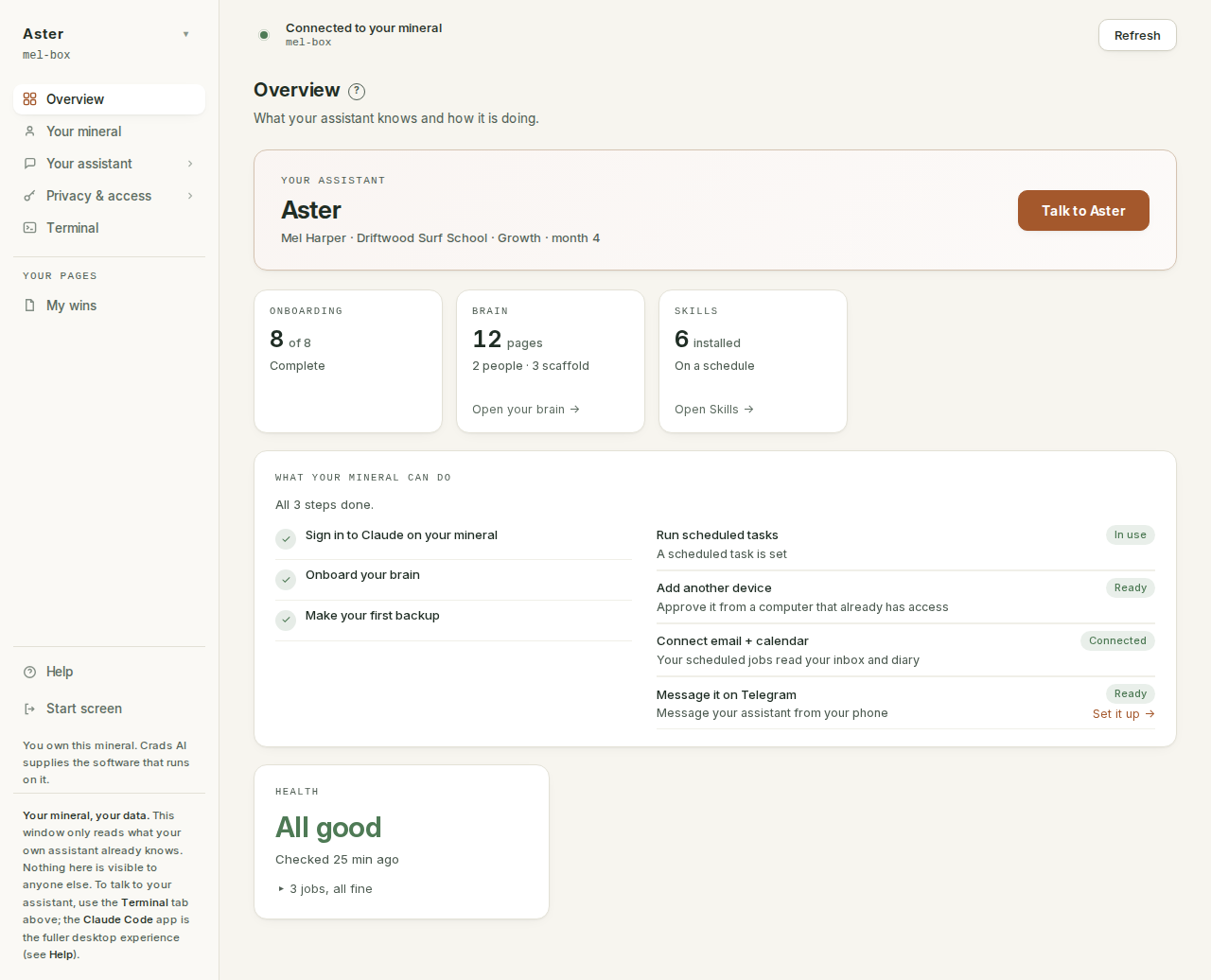
The app opens on the Overview: how much of the interview is done, how much your assistant knows, what it can do yet, and what it ran while you were away. Everything else is one click down the sidebar: its brain, its skills, the tools it can reach, and a terminal where you talk to it.
12345
- Your assistant, by the name you gave it. "Talk to it" opens a conversation.
- How much of the interview is done. Until this completes, every answer your assistant gives is generic.
- How many pages your brain holds. This is what your assistant reads before it answers anything.
- What your pebble can do, and what is still switched off. Each row links to the way in.
- The jobs your mineral runs by itself. Expand it to see each one and when it last ran.
How you get it
Fifteen minutes to a server that is yours. An hour to an assistant that knows you.
-
1
Download the app
Windows or Mac. It is the door to everything else: the setup wizard first, then the assistant itself.
Download → -
2
Build your mineral
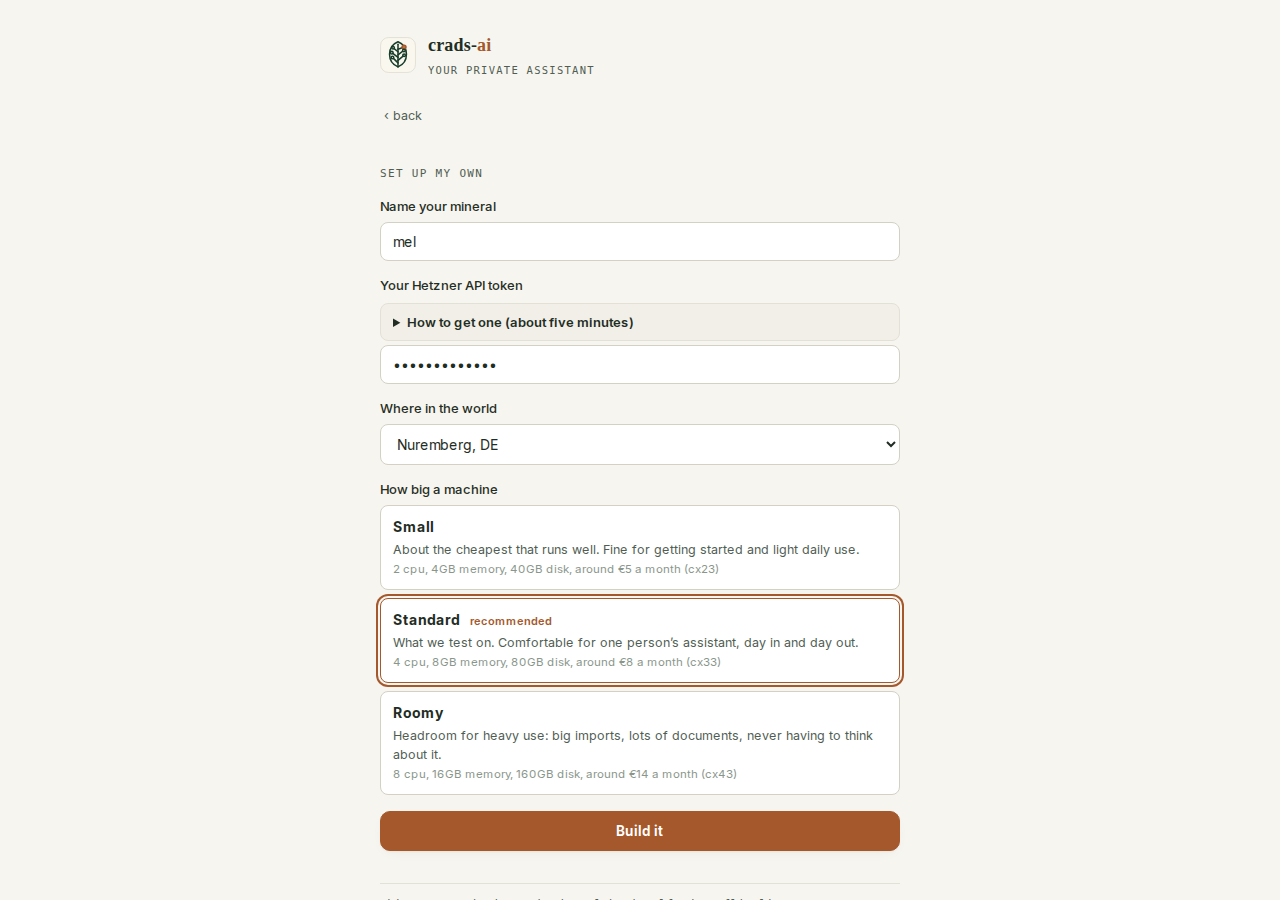
The wizard shows the whole bill first, then builds a small server in your own account at Hetzner (the cheaper, from about €4 a month) or DigitalOcean (which has a Sydney location, from about $24), with your own API token. Billed to you by them. Nothing to Crads-AI, ever.
The first hour, step by step → -
3
Wake it up and do the interview
Sign in with your own Claude subscription, then answer its questions. Out of that conversation it builds a brain: who you are, what you are trying to do, who is in your world, what to never touch.
What the interview asks →
 123
123
- Only the locations your account can actually build in.
- Three plain sizes. The fine print names the real machine and its monthly price where you chose.
- Build it. From here the wizard creates the server on your own account.
Free and yours
No subscription. No hosted box. Nothing central.
Crads-AI used to be a hosted product. In September 2026 that ended, on purpose: the subscriptions and the hosted boxes were retired and the whole thing became free, open source and self-hosted. There is no account with Crads-AI, no server of mine in the chain, and no way for anyone but you to read what your assistant knows.
- Your server. Built in your own hosting account and billed to you by the host. The only key on it is your computer's.
- Your brain repo. Everything it knows about you lives in a private GitHub repository you own, backed up there every night.
- Your Claude. It thinks with your own Claude subscription. Anthropic bills you; nobody else does.
If you ever want out, everything you need to leave is written down, and the code is open source under the AGPL-3.0, so the assistant cannot be taken away from you.
Who it's for
Built for people doing good work, not engineers.
- Impact consultants, B Corp advisers, grant writers and evaluators whose work runs on relationships, reports and follow-through.
- Solo practitioners and small teams who can't justify another subscription, and want their best hours back.
- People who are curious about AI but not technical. You won't write code. You will open a terminal once, and I'll be on the other end of Slack when you do. You describe the work; it learns the work.
- People tired of the AI noise, and wary of handing client data to yet another platform. This is the on-ramp, and it runs on hardware you own.
It started with eight impact-led founders I coached through Impact Collab's Expert Pod in late 2025. They didn't want another tool. They wanted something that knew their business, and that they owned. That is what this became.
What you get out of it
It remembers what you decided. So you don't have to.
The people using it don't describe it as a faster way to do their work. They describe it as somewhere their thinking is kept.
It helps me process ideas and has really helped me lift the mental load of juggling all the moving parts of my business when I'm the only person working on it full time.
 Abbey PantanoFounder, The Impact Collab
When you want a hand
Get it all out of your head.
Crads-AI is free, and the docs get most people there on their own. If you'd rather lay the foundation with someone who has set these up before, here's what you walk away with.
The walkthrough and guided setup are each two 1:1 video sessions, at least a day apart, with written docs you keep and Slack answers within a working day.
Where it lives is your call. On a small server (about A$10 a month, runs while you sleep, talks to you on Telegram) or on your own computer (free, no schedules, only awake when you are). Same price either way.
After 30 days it's yours. You're welcome to invite me back into the chat whenever you like, at A$233 an hour.
Who built it
I built one that runs my whole life.
Seven AI systems in twelve months, and the one I use every day is the assistant you can download here. This is the method my own days run on, not a theory. More about me →
This system
Runs my days
The executive assistant that drafts this site, tracks every conversation, plans my week and writes in my voice. The live blueprint for what you download.
Derwen
Built in 2 weeks
An AI biodiversity assistant: reads a habitat, recommends species, surfaces the peer-reviewed evidence.
Carbon Tracker
3 days → 20 min
An AI system for a UK climate consultancy that turns days of carbon-reporting work into a short, sourced answer.
Seven builds in twelve months. Happy to walk through any of them on a call.
THE STORY · 60 SECONDS
Lay your AI foundation
Before long, most people will work with an assistant that knows them. Yours can start now. Download it and follow the first hour. If you'd rather lay it with someone, book a free thirty-minute call and we will work out what yours would look like. No pitch.
Download the app