Brain
Everything your assistant knows, drawn from the files actually on your mineral.
Everything your assistant knows.
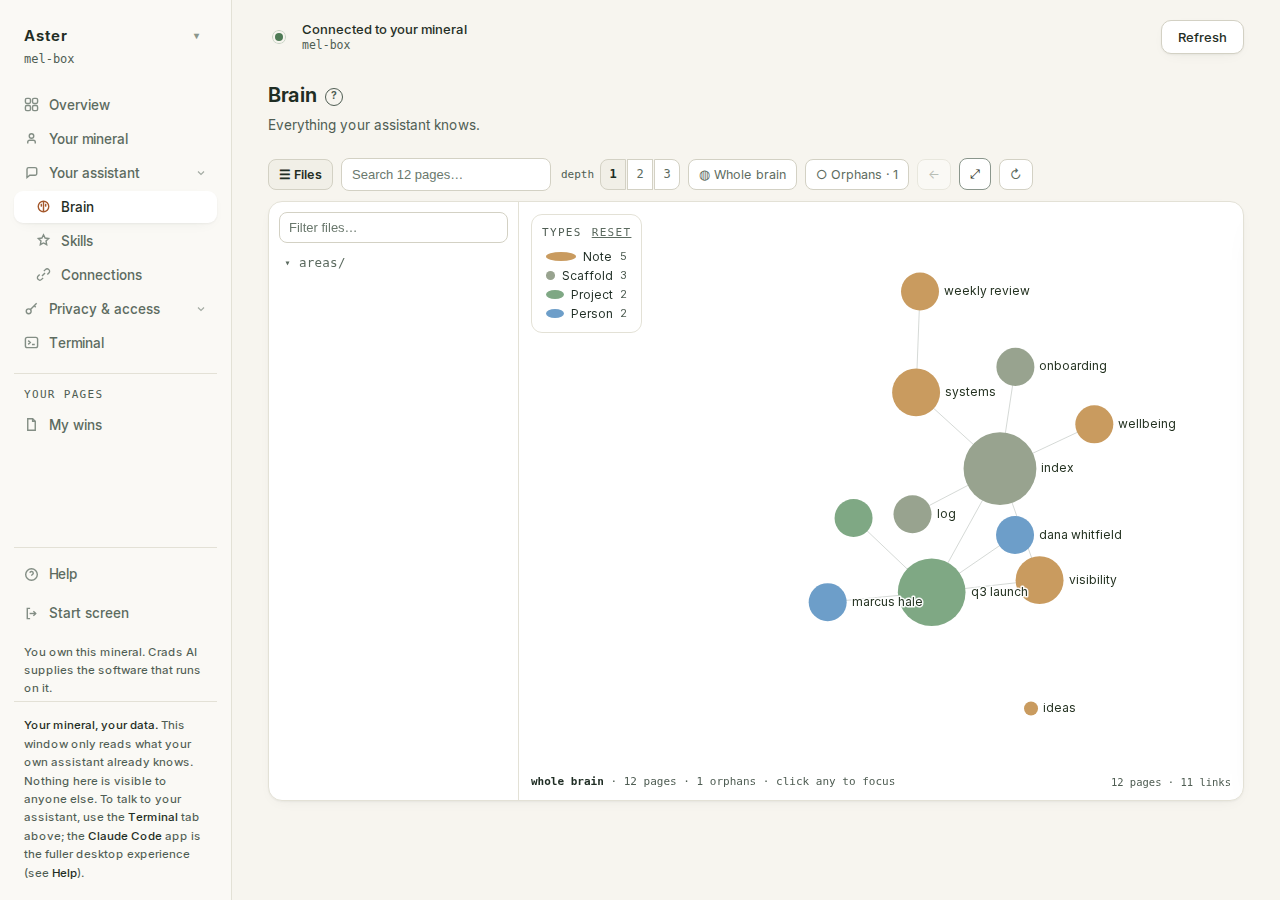
Your brain is a folder of linked markdown pages on your own machine. This page draws them, and it draws what is actually there rather than what a template expected.
Why it cannot be stale#
The graph is parsed from the files at the moment you open it. There is no precomputed artefact to go out of date, which is why a page you wrote a minute ago appears without anything having to rebuild.
Two layers, two cadences, both honest. The picture rides the panel's own refresh: it is pulled when you open the tab and re-pulled about every minute while you stay. The page you read in the side panel is fetched from your mineral at the moment you click it, so what you read is the file as it is now, not as it was when the graph was drawn.
Your structure is yours#
A new mineral starts with eight pages as a starting template, not a schema: north star, philosophy, self, network, past, goals, tasks, workflow. Rearrange them, rename them, delete half of them, invent your own. Nothing breaks.
That is a constraint on us rather than a permission for you: no update, no system page and no engine feature may assume your brain has a particular shape. It is the reason this page draws your actual structure instead of a tidier fiction.
The legend is a filter, and folders become types#
The colour key in the corner is the proof of the previous section. A page's type is derived from the folder it lives in: pages in people/ draw as person, pages in projects/ as project, top-level pages as note. Invent a clients/ folder and a client type appears in the legend with its own colour, without anyone having shipped a feature. The software takes its categories from you, not the other way round.
Each legend row is also a control: click a type to hide it from the view, click again to bring it back, "reset" restores everything. Node size carries information too. The more links a page has, the larger it draws, scaled against the most-linked page currently on screen, so the heavyweights of the current view are always obvious.
What the view opens on#
A small brain (60 pages or fewer) opens on the whole graph, because at that size the whole picture is readable. A larger one opens focused on your most-linked page (skipping the log). Once you have picked a focus it survives the refresh: the panel re-pulling live data will not yank you somewhere else.
The toolbar#
Each control explains itself if you hover it; this is the same wording:
- Files ("Show or hide the file tree"): the pane on the left, with its own "Filter files…" box.
- Search: see below.
- Depth 1 / 2 / 3 ("How far from the selected page to look"): 1 shows pages one link away from the focused page, 2 and 3 widen to two and three hops. Depth only means something with a focus; whole-brain and orphans views ignore it.
- Whole brain ("Show every page at once, including unlinked ones").
- Orphans: carries a live count on the button itself, and reads "Show only the 3 pages nothing links to yet".
- Back ("Back to the previous page"): retraces your focus steps.
- Fit ("Fit the whole view on screen").
- Reheat ("Untangle: rearrange the layout"): re-runs the physics when a layout has knotted itself.
Click a node: the graph is a reader#
Clicking a page opens a reader panel, not a tooltip. At the top, a coloured type chip and the file's path. Then the page's links, sorted by how connected each neighbour is, under a heading that tells you what they are for: "click to travel". Where a link is typed (see below), its label sits beside the neighbour. Under that, the page itself, rendered, read live from your mineral. A page with no links says so plainly: "No links yet: an orphan page."
Wikilinks inside the rendered page are clickable too, so you can read your way across the brain without touching the graph again.
Orphans, defined#
An orphan is a page nothing links to. The Orphans view collects them, and its panel says what that means and what to do: "Pages with no [[links]] to other pages, so they never show up in a connected view. Click any to inspect it; your assistant can link it in."
The files pane holds more than pages#
The tree lists what is actually in the folder, not only markdown: text, CSV and image files render in the same reader, each wearing a small extension chip so a photo and a page sharing a name stay distinguishable. A CSV renders as a real table (with a proper quoted-field parser, so an export with commas inside quotes does not shred), and images render inline.
Search#
Search matches against both title and path, and ranks results by connectedness, so the page you probably mean sits at the top. It is keyboard-driven: arrow keys move the selection, Enter travels, Escape closes. Each result shows the page's type and link count.
Two empty states, honestly different#
An empty brain and a brain the software failed to find are different news, and the page refuses to blur them. A genuinely empty brain says: "No pages yet. Your brain fills in as you talk to your assistant." A missing brain root says where it looked and whose fault that is: "this is a mineral-software problem and not an empty brain. Restarting the mineral picks up the latest published software."
Typed links#
A plain [[wikilink]] draws an edge. A line like
- works-with :: [[abbey]]draws a typed edge: the relation is carried on the link, and the reader shows the label beside that neighbour. The vocabulary is yours; the graph does not police what a relation may be called.
What to do with it#
Early on, look for thin spots. A brain with a rich Network page and an empty Goals page produces an assistant that is good at people and useless about priorities, and the graph shows you that at a glance.
Later, use it to find drift. Pages nothing links to are usually pages you stopped believing in, and the Orphans button counts them for you.
The fastest way to fill a gap is to say so in the Terminal and let your assistant write it down. The most thorough way is to finish the interview.